 |
Summary of the course: |
| |
This introductory six-week course will provide you with the practical skills needed to build websites for nonprofits, small businesses, freelancers and self-employed professionals. By the end of the course, you'll have a functional understanding of web-based technology like HTML and CSS as well as website design principles such as color and typography.
The Website Design for Marketers Certificate Program is designed for beginners with little to no experience in website and graphic design. Each week includes hands-on activities and instruction on how to use industry standard web design applications (such as Adobe Dreamweaver and Photoshop) to ensure you leave the course with useful technical skills. You’ll learn essential tips, techniques and simple, step-by-step instructions to help you plan, design, build, launch and update a small-scale static website. |
|
Some of the DePaul past students' sites. |
| |
|
|
TextBook: There are no required textbooks. Woo Hoo! |
 |
You will be asked to do online or handout readings from time to time.
LearningWebDesig4thEdition_01
LearningWebDesig4thEdition_02
|
|
Recommended books: |
| |
Learning Web Design (4th Edition)
http://www.learningwebdesign.com/ |
| |
Above The Fold
http://abovethefoldbook.com/ |
| |
HTML, XHTML, and CSS, Sixth Edition
Amazon Link |
| |
Don’t Make Me Think:
A Common Sense Approach to Web Usability, 2nd Edition, Steve Krug, New Riders Press
http://www.sensible.com/dmmt.html |
| |
|
| |
Tutorial to watch: |
| |
Dreamweaver basics:
http://tv.adobe.com/show/learn-dreamweaver-cs6/
http://tv.adobe.com/show/learn-photoshop-cs6/
Reading for CSS:
http://www.w3schools.com/css/css_intro.asp
http://www.w3schools.com/css/css_syntax.asp
http://www.w3schools.com/css/css_id_class.asp
http://www.w3schools.com/css/css_boxmodel.asp
Resolution:
http://tv.adobe.com/watch/learn-photoshop-cs6/understanding-resolution/
Pixels:
http://tv.adobe.com/watch/learn-photoshop-cs6/understanding-pixels/
Color explanation:
http://www.youtube.com/watch?v=fNisT6ROdUo |
|
Make TED talk your favorite videoing channels:
TED -- TED stand for Technology, Entertainment, and Design.
http://www.ted.com |
| |
|
|
Contact: email is the best way to get hold to
me! winny@cti.depaul.edu |
| |
My office phone is 773-325-4540, cell: 312-206-8342. I am available to meet by appointment. |
| |
|
| |
Create your subsite in www.depaulkmc-webdesign.com: |
| |
| |
Create your subsite in www.depaulkmc-webdesign.com: |
| |
Note: if you have your own domain and host feel free to use your own domain. |
| |
|
| |
It's always the best to access Server using Dreamweaver or web authoring tool in the future. |
| |
Site SetUp in Dreamweaver: |
| |
For PC user: |
| |
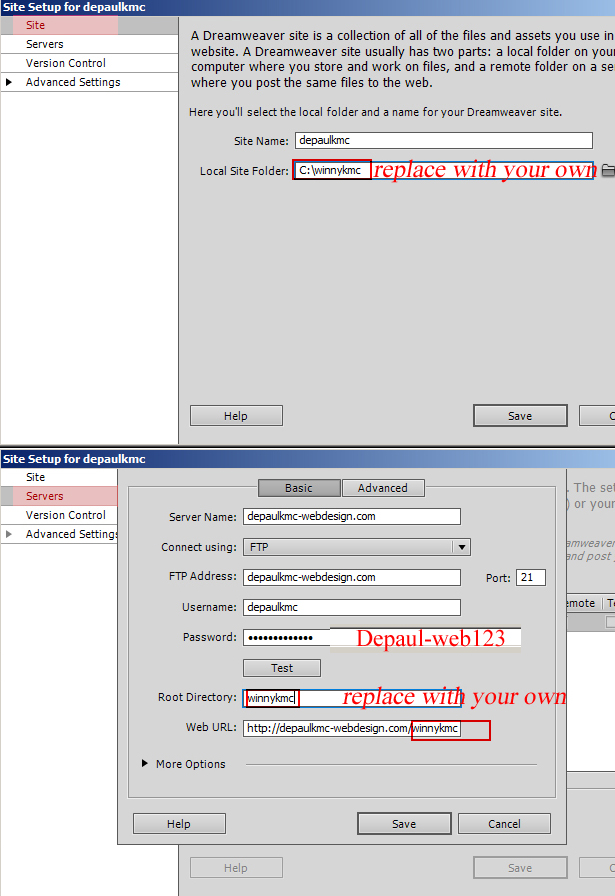 |
| |
|
| |
For PC user: |
| |
 |
| |
For MAC user: |
| |
The best way to connect to server is Dreamweaver, no matter you are using Mac or PC, manage site via Dreamweaver or your preferred web authoring tool.
For adding your subfolder on the server, you can download ftp clients for Mac:
http://www.makeuseof.com/tag/8-free-ftp-clients-for-mac/
Following is File Zilla connect guide.
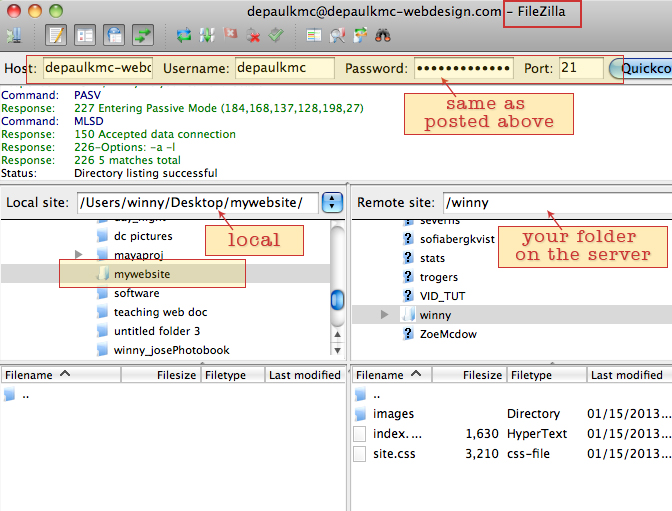
Classic FTP or Filezilla should work file for creating the folder in the server.
Login info is the same as above.
|
| |
|
|
|
Tools we are using for this class: |
| |
Paper cards/pencil :) |
| |
Dreamweaver;
Photoshop;
Flash;
Trial version downloadable at http://www.adobe.com/downloads/ |
| |
|
|
The website you need to know for this course:
1. D2L
2. Course homepage: http://depaulkmc-webdesign.com/
Alias website: depaulkmc-webdesign.net;
depaulkmc-webdesign.org
3. depaulkmc-webdesign.com - is our shared domain for this class
4. Adobe Online Video Tutorial: http://www.adobe.com/designcenter/video_workshop/
5. Online Tutorial at Lynda: http://www.lynda.com/
6. Wikipedia, google, gettyimages, flickr… make them your good friends. |

